|
Chapter 1 |
1. Getting Started
1.1 Starting WOW
To start WOW from the PlanetJ website, navigate to the following address:
http://www.planetjavainc.com/wow/WOWBuilder
If you have WOW installed on a local computer or intranet, simply use your web browser to go to the location where WOW is installed on your system. This will most likely be http://my_server_name/wow64/WOWBuider where my_server_name is the name of your web server. Version 6.4 is activated using the context “wow64”. Various version of WOW can be run concurrently. For example, the upcoming WOW 7.0 will use the context “wow70”.
A Sign-On page will appear once WOW has been started in the web browser.
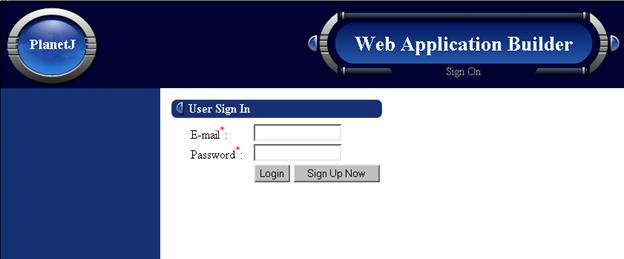
Initial sign-on screen which allows application builders to sign-on to WOW.
Sign-on Fields
E-mail (Required Field) – The e-mail address used during the registration process (explained in section 1.3). The same information will be used to login to WOW.
Password (Required Field) – The unique password specified during the registration process.
1.2 Signing on to WOW
In order to use WOW, one must log-in. Enter your e-mail address and password. If you have not yet registered, click the ‘Click here to sign up now’ text below the login prompt.
1.3 User Registration
Clicking on the ‘Click here to sign up now’ text will take you to the User Registration page. Throughout this guide as well as throughout WOW, required fields will be indicated by a red asterisk (*). After all relevant information is entered, click the Sign Up button to add the new registration information into the database. The specified e-mail address and password can now be used to login to WOW.
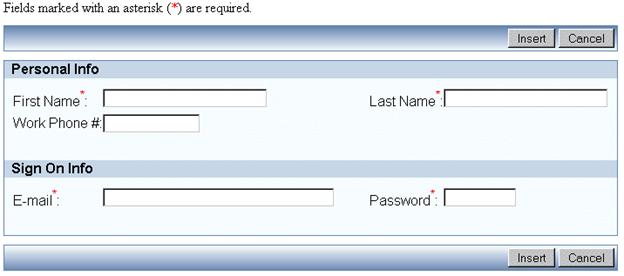
The User Registration screen. Before application builders can start to use WOW, they must sign up. This screen is accessed by clicking the Sign Up Now button as shown in Figure 1-1.
Personal Info
First Name (Required Field) – The first name that will be used in conjunction with WOW.
Last Name (Required Field) – The last name that will be used in conjunction with WOW.
Work Phone Number – The optional phone number used to contact the user.
Sign-On Info
E-mail (Required Field) – The email address which will be used to login to WOW.
Password (Required Field) – The password used to login to WOW. The maximum length is 10 characters. Passwords should be as unique as possible. It is recommended to use combination of letters and numbers that is not a real word that can be found in a dictionary.