|
Chapter 7 |
7. Updating Records
7.1 Basic SQL Queries using the UPDATE Command
The UPDATE statement is used to change data in a table. Using the UPDATE statement allows you to change the value of one or more columns in each row of the table. The screen shot below shows an example of an UPDATE statement. Previous knowledge of SQL and familiarity with the UPDATE statement is recommended.
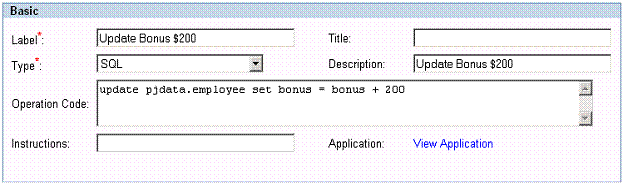
Figure 7-1 This is an SQL Operation which uses the UPDATE command. The UPDATE command is another powerful feature of SQL and can be used easily from within WOW.
The SQL statement in the Operation Code:
UPDATE PJDATA.EMPLOYEE SET BONUS = BONUS + 500
This is a simple SQL query that is updating (giving a raise to) all employees. The basic syntax of an UPDATE statement is listed above. The UPDATE keyword is directly followed by the name of the table to be updated. In this case it’s the EMPLOYEE table in the PJDATA schema. The SET clause names the columns you want to be updated and provides a value for you to update. The bonus for all employees is 200 dollars. The new value for bonus will then be the old value plus 200 more.
7.2 Using a WHERE clause with the UPDATE statement
The WHERE clause and UPDATE statement are commonly used
together. By using the WHERE clause in conjunction with the UPDATE statement,
a user can specify only certain values that meet a certain criteria. The
screen shot below will show how to use the WHERE clause in an UPDATE query.
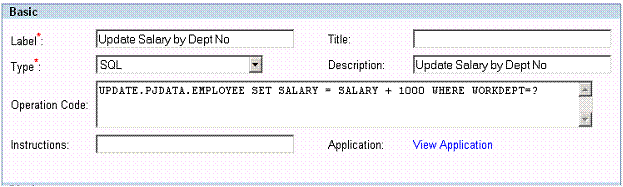
Figure 7-2 This SQL command uses the UPDATE command in conjunction with the WHERE command.
The SQL statement in the SQL field:
UPDATE.PJDATA.EMPLOYEE SET SALARY = SALARY + 1000 WHERE WORKDEPT=?
The above statement is a simple SQL UPDATE query. The UPDATE command points to the location of the table. In this example the table is EMPLOYEE in the PJDATA schema. The SET command sets the salary to equal to the current salary and adds 1000. By using the WHERE statement the user can enter a specific work department; only employees in that department will receive raises. The question mark allows the user to enter any work department when this command is run.
7.3 Joined Updates
[ Supported as of WOW 6.4 SP3 ]
A joined update occurs when a user edits and updates values in a joined row. (A joined row is a row containing data from multiple tables. For example a query like SELECT * FROM JETEMP.CUSTOMER JOIN JETEMP.CUSTLOC ON CLOCID = LOCID would result in joined rows.)
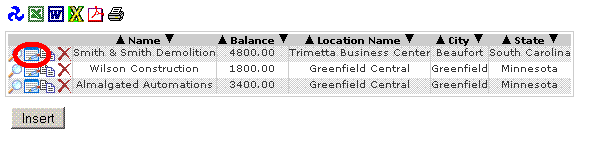
Figure 7-1 Editing a row containing data from multiple tables will initiate a joined update
During a joined update the user is shown fields from all tables on the same screen. There is no indication given to the user of which fields belong to which tables.
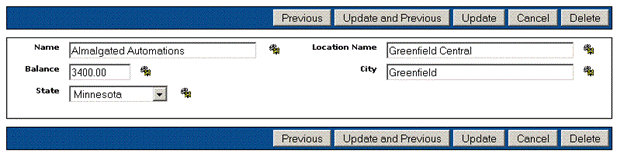
Figure 7-2 Fields from all tables are displayed together when a joined row is updated
Restrictions
Each field name in a joined update must apply to a single table. When two or more tables have columns with the same name, those columns cannot be used in a joined update to those tables. In addition, the row being used for the joined update must contain all the key fields for all of the tables being jointly updated.
Transactions
The SQL standard does not allow for updating multiple tables with a single statement, therefore internally WOW splits the update statement into multiple separate SQL statements and sends them all to the database. It is possible for one statement to succeed but for the other statements to fail (a dropped network connection or an authorization error are two things that could cause one statement to work and then others to fail). When the first statement fails, WOW abandons the update and reports the error as usual. However, if a subsequent statement fails after the first statement succeeds, the database could be left in a corrupted state. For this reason you may wish to configure your application not to use joined updates, or to use database transactions.
A transaction is a way of bundling multiple SQL statements into a single unit of work – that unit of work will either succeed or fail as a whole. If it fails then none of the statements in the transaction will have affected the database. Some databases do not support transactions, and other databases require special configuration before transactions can be used. Check with your database documentation to find out how to configure transactions on your database.
By default WOW will not use transactions for joined updates. If you want WOW to issue your joined update as a single transaction (which is recommended if your database supports transactions), you must use the Join property group to specify this:
Join {
transactions: true;
}
This property group should be placed in the properties field of the operation which selected the joined rows. Alternatively you can place this property group in the properties field of the application, where it will apply to all of the operations in that application.