|
Chapter 8 |
8. Deleting Records
8.1 Basic SQL Queries using the DELETE Command
The DELETE statement is used to remove entire rows from a table. The DELETE statement cannot remove specific columns from a row. If the WHERE statement in a DELETE query is omitted, SQL will remove all the data in the table.
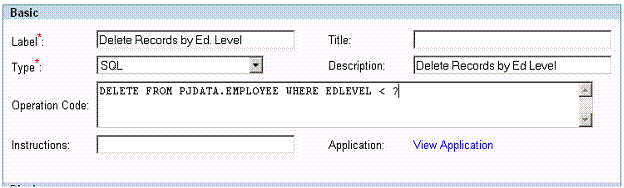
Figure 8-1 An SQL statement that will delete records from a table.
A simple SQL DELTE statement goes as follows:
DELETE FROM PJDATA.EMPLOYEE WHERE EDLEVEL < ?
Notice the keyword FROM following the DELETE command which specifies which table to delete data from. In this example, the SQL statement is deleting data from the EMPLOYEE table in the PJDATA schema. The WHERE clause is extremely important when using the DELETE command. All rows whose EDLEVEL is less than the value entered at runtime will be deleted from the table.
8.2 Deleting Rows without SQL Commands
It is possible to delete rows without an SQL Command. This is done by selecting specific rows from a table using their check boxes, and then clicking the Delete button under the data. The selected rows will be removed from the table. If you have set the SelectionType to none in the properties section this option is not available. SelectionType will be described in more detail in section 10.2. The screen shot below shows the data retrieved from a simple SELECT command. Any of the rows could be deleted using this deletion method.
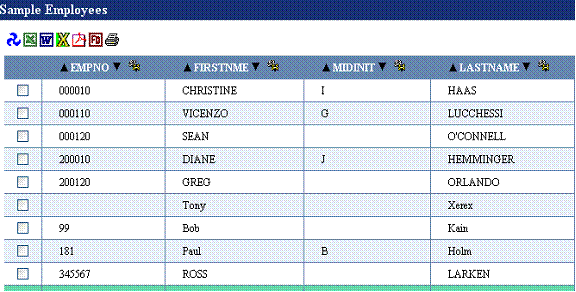
Figure 8-2 This shows the results table of an SQL operation. The checkbox on the far left allows users to select individual rows, in this section you would use the checkbox to select a row and then delete it.
8.3 Joined Deletes
[ Supported as of WOW 6.4 SP3 ]
A joined delete occurs when a user deletes a joined row. (A joined row is a row containing data from multiple tables. For example a query like SELECT * FROM JETEMP.CUSTOMER JOIN JETEMP.CUSTLOC ON CLOCID = LOCID would result in joined rows.)
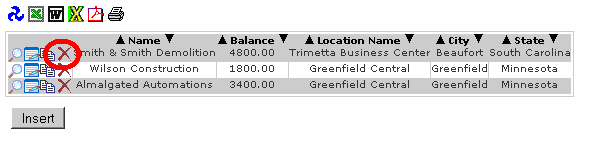
Figure 8-1 A joined delete occurs when a row contained data from multiple tables is deleted
Restrictions
A joined row must contain all key fields for all of its tables – otherwise that row cannot be used for a joined delete.
Transactions
The SQL standard does not allow for deleting records from multiple tables with a single statement, therefore internally WOW splits the delete statement into multiple separate SQL statements and sends them all to the database. It is possible for the one statement to succeed but for the other statements to fail (a dropped network connection or an authorization error are two things that could cause one statement to work and then others to fail). When the first statement fails, WOW abandons the update and reports the error as usual. However, if a subsequent statement fails after the first statement succeeds, the database could be left in a corrupted state. For this reason you may wish to configure your application not to use joined deletes, or to use database transactions.
A transaction is a way of bundling multiple SQL statements into a single unit of work – that unit of work will either succeed or fail as a whole. If it fails then none of the statements in the transaction will have affected the database. Some databases do not support transactions, and other databases require special configuration before transactions can be used. Check with your database documentation to find out how to configure transactions on your database.
By default WOW will not use transactions for joined deletes. If you want WOW to issue your joined delete as a single transaction (which is recommended if your database supports transactions), you must use the Join property group to specify this:
Join {
transactions: true;
}
This property group should be placed in the properties field of the operation which selected the joined rows. Alternatively you can place this property group in the properties field of the application, where it will apply to all of the operations in that application.