|
Chapter 14 |
14. Stored Procedures
14.1 Stored Procedure Overview
A stored procedure consists of one or more SQL statements that have been precompiled on a database system. All of the SQL examples in the above chapters are dynamic SQL statements – no compilation takes place until they are run. For this reason, stored procedures tend to perform better than dynamic SQL. This chapter will discuss how to call stored procedures and display their results using WOW. Creating stored procedures is not covered in this guide. For more information on creating stored procedures check your database documentation.
14.2 Calling Basic Stored Procedures
The SQL for calling a stored procedure named MYSP located in the PLANETJTMP library is:
CALL PLANETJTMP.MYSP()
To call this stored procedure and display the results it returns in WOW, simply place type this SQL in the code section of an operation.

Figure 14-1 The code for calling a stored procedure
NOTE: When calling MS SQL SERVER stored procedures, you may need to place the stored procedure call within {}. For example: {call mySqlServer.myStoredProc() } Consult the database documentation for details for each specific database being used.
When you run the operation, the results are displayed like a normal select statement:
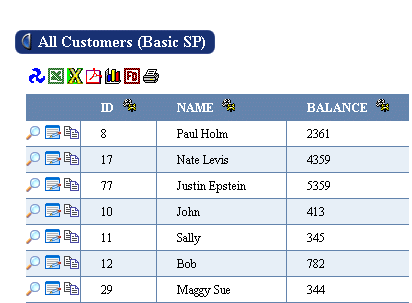
Figure 14-2 The results of a stored procedure. The column headings are the names of the SQL database columns.
By default, when the results from a stored procedure call are displayed, they do not make use of any field descriptors you have created. (Field descriptors are covered in more detail in Chapter 9.) This is because the names of the actual tables from which the results are read are not present in the SQL code that is entered in WOW; the table names are contained inside the stored procedure code, which WOW does not have access to.
In order to have your results use the field descriptors you have created, you must add a StoredProcedure property group to the properties of the operation which calls the stored procedure. In the tables property of the StoredProcedure property group, you should list the names of the tables which are used in the query. NOTE: This property group goes in the Properties section of the operation, NOT the op code! For example:
StoredProcedure {
tables: planetj.customer, planetj.balancedta;
}
Once you do that, then your results will use the appropriate field descriptors when they are displayed:
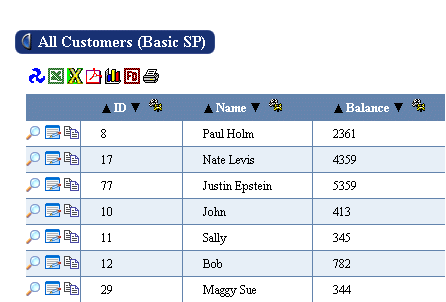
Figure 14-3 The results of a stored procedure. The column headings are taken from the field descriptors of the specified tables.
14.3 Passing Parameters to Stored Procedures
Many stored procedures have input parameters whose values are used at runtime to execute a query. To call a stored procedure and prompt the user at runtime to supply the values for its parameters, you must identify which field descriptors to use when generating the input prompts. For example, in the screenshot below the stored procedure is being passed two parameters, the first will use field descriptor 1135 (this is the id of the desired FD) to display the prompt to the user and the second will use field descriptor 1139.

Figure 14-4 Code for calling a stored procedure, and prompting the user for its input parameter values. The ID of the field descriptors to use for the prompting must be specified in the call.
You cannot use a single question mark as a parameter in a stored procedure as you can with other SQL statements. For more information on prompting by field descriptor ID’s, see the Parameter section of the WOW Features chapter.
14.4 Inserting, Updating, and Deleting
Some stored procedures do not return rows from the database for display; instead they alter one or more database tables. To identify these types of stored procedures, you should specify a value of false for the rowCollection property of the StoredProcedure property group.
StoredProcedure {
tables: planetj.customer, planetj.balance;
rowCollection: false;
}
This lets WOW know that it should not attempt to display a collection of rows read from the database as a result of calling the stored procedure.