|
Chapter 24 |
24. WOW Performance
24.1 Basic Overview
WOW utilizes the JDBC database servers that are specified in the connection definitions.
Typically performance is nearly all outside of WOW's control.
What happens is:
- WOW passes an SQL statement to the server (AS400).
- The server (AS400) executes the statement using the best known optimization, as determined by database code. This includes such factors as file size and database indexes.
- After execution, WOW reads the data returned from the server (AS400), generates HTML, and then sends the HTML to the browser. Thus, nearly all performance is dependent on the database server (AS400).
However, WOW does have facilities to control and enhance performance as shown in the sections that follow.
24.2 WOW's Built In High Performance Cache
WOW allows the user to set a caching level for each operation:
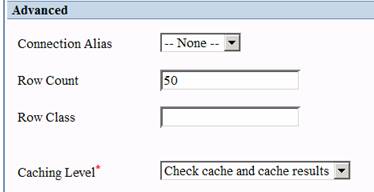
Figure 1 - Caching option
The Caching options let you control how WOW stores data so it can be used later. By allowing WOW to retrieve the data from the cache, a call to the database server can be avoided when the operation is run. For more details on the caching level, see chapter “Create User Operations”, section “User Operations” in the WOW Builder’s Guide.
24.3 Connection properties
Each JDBC database driver allows properties to be passed to the database server. You can specify these properties in the connection definition:

Figure 2 – Properties Option
For the IBM AS/400 Remote driver, these can be found in the IBM Toolbox for Java reference (section JDBC Properties) http://publib.boulder.ibm.com/infocenter/iseries/v5r3/ic2924/index.htm?info/rzahh/page1.htm :
By default, WOW sets the following two AS/400 properties on a new connection:
- prompt=false - Specifies whether the user is prompted if a user name or password is needed to connect to the server. If a connection cannot be made without prompting the user, and this property is set to "false", then an attempt to connect will fail.
- trace=false - Specifies whether trace messages are logged. Trace messages are useful for debugging programs that call JDBC. However, there is a performance penalty associated with logging trace messages, so this property should only set to "true" for debugging. Trace messages are logged to System.out.
Note that each property begins with a “;”.
You can also affect performance by setting the number of maximum connections allowed:

Figure 3 - Maximum Connections Setting
The default is ten. The maximum number of connections used can have a significant affect on your performance. This number will vary based on the power of the system.
24.4 Controlling the Number of Records Returned
Setting the number of records returned in an SQL operation can improve performance.

Figure 4 - Row Count option
The Row Count value controls how many rows are displayed in the results table. The smaller the number, the quicker each read from the database is. The default is 50. If the number of results is greater than the row count, links are generated on the results table allowing the user to page through it. This field should be adjusted based on your system performance and connection speed.
24.5 Controlling the Nnumber of Fields Read
Reducing the number of fields read from an SQL SELECT statement to only those required can improve performance since less data will need to be read from the database. For example, instead of specifying all fields (‘*’), specify only the specific fields necessary:
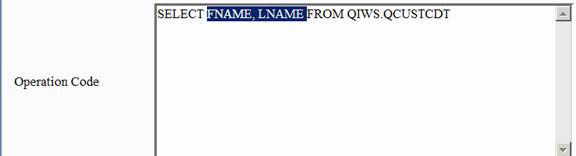
Figure 5 - SELECT with only 2 fields
24.6 Optimizing SQL Performance for AS400 (iSeries)
There are a variety of methods or tools to determine how the performance of an SQL statement can be improved on an AS/400.
Find a reference(s) to SQL statement optimization techniques for AS400.
24.6.1 Compare SQL Performance Against Non-WOW Methods
Try taking the SQL statement from WOW and use one of these other methods to compare the results:
· AS400's STRSQL
Or
· Put the SQL into iSeries Navigator (Run SQL Scripts)
If the SQL statement performs poorly by methods other than WOW, most likely the problem lies with the SQL statement or the file itself.
You can use debug messages for performance hints. On the AS/400:
· Turn debug on for your session è STRDBG *ALL .
· Run the SQL statement (to be run in the operation) using STRSQL.
· After successfully running the statement, look at the job log for debug messages from the query optimizer.
24.6.3 Using iSeries Navigator (STRDBMON)
The iSeries Navigator version of the STDBMON is called a detailed SQL performance monitor. You can start this monitor by right-clicking SQL Performance Monitors under the database portion of the iSeries Navigator tree and selecting New-> Detailed. You can monitor a single query or all queries. Once the monitor is started, it appears in the SQL performance monitors list.
For more details on iSeries optimization, see the “Optimizing Query Performance Using Query Optimization Tools” section in the “Performance Optimization” Reference: http://publib.boulder.ibm.com/infocenter/iseries/v5r3/ic2924/index.htm?info/rzahh/page1.htm
24.6.4 Controlling How the Data is Accessed
On the iSeries, how the data from a file is accessed is determined by the query optimizer. If an index exists, the index is used. Otherwise, that decision is left to the query optimizer, which may not be the most efficient means. For more information on indexes (iSeries), see the Performance and Optimization reference http://publib.boulder.ibm.com/infocenter/iseries/v5r3/ic2924/index.htm?info/rzahh/page1.htm
24.7 Tomcat Server Performance
How you have your server configured can also affect your overall performance. For example, the amount of memory allocated to your server can have quite an effect on how the WOW application performs. For more information on Tomcat configuration, see the Optimizing Tomcat reference. http://www.planetjavainc.com/wow_docs/Optimize_Tomcat_form.pdf?target=_blank .