|
Chapter 26 |
26. WOW Administration and Support
26.1 Backing Up WOW Metadata
All of WOW’s critical information is found within its metadata. This makes backing up your data very crucial. Backing up important data within WOW or any other program for that matter is one of the most important ways you can assure that your organization will run smoothly. The backup process will be different on most machines.
Backing Up WOW Metadata from AS/400
If your installation stores WOW metadata on the AS/400 you should regularly backup the libraries PJUSER64 and PJSYS64. PJUSER64 contains user metadata while PJSYS64 contains WOW metadata. By default, the PJUSER64 library contains all operations, applications, and field descriptors that you will have created. In the event of disaster recovery, restore these libraries to your AS/400. (If you are using an application library other than the default, then you should backup that library.)
Backing Up WOW Application Code
You should also regularly backup WOW’s application code and any customer Java classes or other web files you may have created during your development. All this code is contained and web files are contained with in your application server’s …/webapps/wow64 folder. This folder should be backed up on a regular basis.
Backing Up WOW Metadata from Windows DB2
NOTE: You do not need to backup DB2 on Windows for WOW 6.4. Storing WOW metadata on DB2 on Windows is not formally supported in WOW 6.4.
This section will give an overview of backing up metadata using DB2 for Windows (DB2 is IBM’s Database program).
To back-up metadata with IBM WebSphere first goto:
Programs-> IBM DB2 ->Control Center
Once the DB2 Control Center is opened locate the database where your metadata is located. If there are any other databases that are important you can back them up here also. To backup a database simply right click on the database and go to backup-> database. After clicking database another window will open which will be similar to the screenshot below:
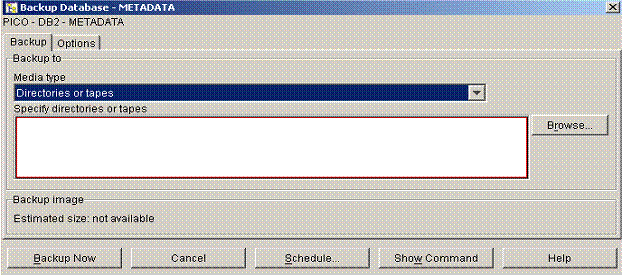
Figure 26-1 The screenshot above shows the control center component for backing up metadata.
Next click browse, enter the location where you want your metadata backup saved to and click backup now. You will get two messages the first telling you the backup has began and the next telling you the backup has been completed.
26.2 Disaster Recovery
Disaster recovery procedures involve the following steps.
- Restore the application server on which WOW is running. Normally, this will be either Tomcat or WebSphere. The WOW 6.4 CD bundles all needed components plus Tomcat. This CD can be used to restore the application server in the event it is needed.
- Restore or replace the …/webapps/wow64 folder in your environment. This will restore all WOW’s application code plus any user specific files.
- Restore AS/400 libraries PJSYS64 and PJUSER64 from your backups. These libraries contain metadata used to execute WOW based applications.
26.3 Version Control
Managing WOW application from a version control perspective involves the following steps.
26.3.1 Web Resources (Java, JSPs, HTML, etc)
These resources are PC based files residing in your IDE of choice and ultimately in the webapps/wow64 folder of your application server. These files can integrate with any PC version control package such as CSV. These web resources residing in folder wow64 can be saved at a version boundary using a simple windows copy folder operation and archived along with the metadata to provide version control and backup support.
Metadata can be achieved at version boundaries with the associated web resources from above. Simply copying the library or schema at a version boundary also provides for version control.
NOTE: using the application library support described in this manual can enable multiple version support.
26.4 Web Application Server Information
WOW has the ability to run on different Web Applications Servers. Web Application Servers are used to put dynamic information on the Web. WOW runs on three major Web Applications Servers. These are IBM WebSphere, Apache Tomcat, and Web Logic. Tomcat is the only free Web Application Server of the three. The following links will direct you to detailed information on the various application servers.
IBM WebSphere
http://www.ibm.com/software/webservers
Apache Tomcat
http://jakarta.apache.org/tomcat
Web Logic
http://www.bea.com/products/weblogic/server
26.5 Getting Support for WOW
Terms and conditions of WOW support vary based on your individual license agreement. In general technical defect support is provided as part of your purchase while product usage, design, and consulting support at chargeable items.
NOTE: WebSphere, Tomcat, and Weblogic are separate and independent products. Technical support for usage and defects is NOT covered by your WOW license.
Below is the contact information that can be used to get any information that you need concerning WOW.
Email Address:
Technical Support by Phone:
760.432.0600
WOW Frequently Asked Questions (FAQ):
http://www.planetjavainc.com/wow/runApp?id=209
26.6 WOW Copyright Information
The Web Object Wizard (WOW) is owned by PlanetJ Corporation, copyright 2003.
This product includes software developed by the Apache Software Foundation (http://www.apache.org/)